JavaFX で英語力を補う

このエントリーは、JavaFX Advent Calendar 2014, 11日目のおまけです。

昨日は @toruwest さんの「JavaFXのTreeViewでアニメーションしてみる」でした。

明日は @skrb さんの「Java Advent Calendarと一緒になにか書きます」です。

JavaFX Advent Calendar 2014、6日目の Katsumi Kokuzawa さんの「JavaFXでMarkdownエディタを作る」を読んで

リアルタイムに入力されたテキストが変換され表示されるのって格好いいなぁって思ったので自分もチャレンジしてみた。

私は英語が駄目な残念な人間なので Google さんと JavaFX さんに助けてもらうことにしました。

翻訳と音声は java-google-translate-text-to-speech を利用させていただきました。

翻訳は下記 FXMLDocumentController クラスのソースコード 145 行目から 152 行目までのところで処理をしています。

文字を一部置き換えているのはエラーが出るためのその場しのぎの適当な対応です。

それと長文になるとエラーが出ます。

そういう仕様なのかバグなのか、使い方が悪いのかは解りません。(^_^;)

とりあえず的な(使い物にならない)翻訳機を作ったよというお話しでした。

動画とプログラムのコードを貼っておきます。


package jp.yucchi.javafx.google.translater;

import javafx.application.Application;
import javafx.fxml.FXMLLoader;
import javafx.scene.Scene;
import javafx.scene.layout.AnchorPane;
import javafx.stage.Stage;

/**
 *
 * @author Yucchi
 */
public class JavaFXGoogleTranslater extends Application {
    
    @Override
    public void start(Stage stage) throws Exception {
        
        FXMLLoader loader = new FXMLLoader(getClass().getResource("FXMLDocument.fxml"));
        loader.load();
        AnchorPane root = loader.getRoot();
        Scene scene = new Scene(root);
        
        FXMLDocumentController controller = loader.getController();
        controller.setStage(stage);
        
        stage.setResizable(false);
        stage.setTitle("JavaFX Google Translater");
        stage.setScene(scene);
        stage.show();
        
    }

    /**
     * @param args the command line arguments
     */
    public static void main(String[] args) {
        launch(args);
    }
    
}


package jp.yucchi.javafx.google.translater;

import com.gtranslate.Audio;
import com.gtranslate.Language;
import com.gtranslate.Translator;
import java.io.IOException;
import java.io.InputStream;
import java.net.URL;
import java.util.ResourceBundle;
import java.util.concurrent.ExecutorService;
import java.util.concurrent.Executors;
import java.util.logging.Level;
import java.util.logging.Logger;
import javafx.application.Platform;
import javafx.beans.binding.Bindings;
import javafx.beans.property.StringProperty;
import javafx.concurrent.Task;
import javafx.event.ActionEvent;
import javafx.fxml.FXML;
import javafx.fxml.Initializable;
import javafx.scene.control.Button;
import javafx.scene.control.Label;
import javafx.scene.control.ProgressIndicator;
import javafx.scene.control.TextArea;
import javafx.stage.Stage;
import javazoom.jl.decoder.JavaLayerException;

/**
 *
 * @author Yucchi
 */
public class FXMLDocumentController implements Initializable {

    @FXML
    private Label jp;

    @FXML
    private Label en;

    @FXML
    private TextArea jTextArea;

    @FXML
    private TextArea eTextArea;

    @FXML
    private Button clearButton;

    @FXML
    private Button eSpeakButton;

    @FXML
    private ProgressIndicator progressIndicator;

    private ExecutorService service;

    private Task task;

    @FXML
    private void clearButtonAction(ActionEvent event) {

        jTextArea.setText("");
        eTextArea.setText("");

        if (!task.isCancelled()) {
            task.cancel();
        }

    }

    @FXML
    private void eSpeakButtonAction(ActionEvent event) {

        eSpeakButton.setVisible(false);
        progressIndicator.setVisible(true);

        task = new Task() {
            @Override
            protected Void call() throws Exception {

                InputStream sound = null;
                try {
                    Audio audio = Audio.getInstance();
                    sound = audio.getAudio(eTextArea.getText(), Language.ENGLISH);
                    audio.play(sound);
                } catch (IOException | JavaLayerException ex) {
                    Logger.getLogger(FXMLDocumentController.class.getName()).log(Level.SEVERE, null, ex);
                } finally {
                    try {
                        sound.close();
                    } catch (IOException ex) {
                        Logger.getLogger(FXMLDocumentController.class.getName()).log(Level.SEVERE, null, ex);
                    }
                }

                return null;
            }

            @Override
            protected void succeeded() {
                eSpeakButton.setVisible(true);
                progressIndicator.setVisible(false);

            }

            ;
         
          @Override
            protected void cancelled() {
                eSpeakButton.setVisible(true);
                progressIndicator.setVisible(false);
            }

            @Override
            protected void failed() {
                eSpeakButton.setVisible(true);
                progressIndicator.setVisible(false);
            }

        };

        service.submit(task);

    }

    @Override
    public void initialize(URL url, ResourceBundle rb) {

        progressIndicator.setVisible(false);

        service = Executors.newSingleThreadExecutor();

        eSpeakButton.disableProperty()
                .bind(
                        Bindings.when(eTextArea.textProperty().isEmpty())
                        .then(true)
                        .otherwise(false));

        clearButton.disableProperty()
                .bind(
                        Bindings.when(jTextArea.textProperty().isEmpty().and(eTextArea.textProperty().isEmpty()))
                        .then(true)
                        .otherwise(false));

        jTextArea.textProperty().addListener(observable -> {
            final String s = ((StringProperty) observable).get();
            // エラー出るため適当に置き換え
            final String _s = s.replaceAll("\\r\\n|\\r|\\n", "").replaceAll("。", ".").replaceAll("、", "").replaceAll("?", "?").replaceAll("!", "!");
            Translator translate = Translator.getInstance();
            String englishText = translate.translate(_s, Language.JAPANESE, Language.ENGLISH);
            eTextArea.setText(englishText);
        });
    }

    void setStage(Stage stage) {

        stage.setOnCloseRequest(we -> {

            if (service != null && !service.isShutdown()) {
                service.shutdownNow();
            }

            Platform.exit();
            System.exit(0);

        });

    }

}


これで英語力が上がるとうれしいけど努力しないでってのは完全に無理な話しですね。

JavaFX 楽しい!

Hatena タグ:

SwingNode と TextFlow

このエントリーは、JavaFX Advent Calendar 2014, 11日目のおまけです。

昨日は @toruwest さんの「JavaFXのTreeViewでアニメーションしてみる」でした。

明日は @skrb さんの「Java Advent Calendarと一緒になにか書きます」です。

今年も JavaFX でいろいろなことを楽しんだのでそのうちの一部を紹介します。

はじめに、Swing では JTextPane ってのがあって普通の JTextArea よりも柔軟に扱えます。

テキストのスタイルを簡単に変更できたりしてとても便利でした。

JavaFX に JTextPane に相当するものがあるかと言えば無さそうです。

編集できなくて表示だけなら TextFlow がかなり強力に使えます。

私は TextFlow を使うのを躊躇ってなんとか JTextPane を JavaFX で使ってやろうと SwingNode に手を出してしまいました。

何をしたかったかというとテキスト検索で検索文字にヒットしたらその文字を良く解るように色づけ、太字表示をしたかっただけです。

SwingNode は javafx.embed.swing.SwingNode クラスでこれを使うには

public void setContent(JComponent content)

で Swing コンポーネントをセットします。

ただし、JavaFX アプリケーションスレッドを使わずに

public static void invokeLater(Runnable doRun) メソッドを使用して

doRun.run()を、AWTイベント・ディスパッチ・スレッドで非同期的に実行させます。

このメソッドは実際は java.awt.EventQueue.invokeLater()を呼び出しているだけです。

Swing コンポーネントの操作をするときには面倒だけど AWT のスレッドでってことのようです。

はっきり言ってよっぽどの事情がないかぎり SwingNode なんて使おうと思わない。(^_^;)

いつも通り雑なサンプルプログラムを載せておきます。


package jp.yucchi.swingnodeexample;

import javafx.application.Application;
import javafx.fxml.FXMLLoader;
import javafx.scene.Parent;
import javafx.scene.Scene;
import javafx.stage.Stage;

/**
 *
 * @author Yucchi
 */
public class SwingNodeExample extends Application {

    @Override
    public void start(Stage stage) throws Exception {
        Parent root = FXMLLoader.load(getClass().getResource("FXMLDocument.fxml"));

        Scene scene = new Scene(root);
        stage.setTitle("SwingNode Example");
        stage.setScene(scene);
        stage.setResizable(false);
        stage.show();

    }

    /**
     * @param args the command line arguments
     */
    public static void main(String[] args) {
        launch(args);
    }

}

package jp.yucchi.swingnodeexample;

import java.awt.Color;
import java.awt.Dimension;
import java.awt.Font;
import java.net.URL;
import java.util.ResourceBundle;
import java.util.regex.Matcher;
import java.util.regex.Pattern;
import javafx.beans.binding.Bindings;
import javafx.embed.swing.SwingNode;
import javafx.event.ActionEvent;
import javafx.fxml.FXML;
import javafx.fxml.Initializable;
import javafx.scene.control.TextArea;
import javafx.scene.control.TextField;
import javafx.scene.control.ToggleButton;
import javax.swing.JScrollPane;
import javax.swing.JTextPane;
import javax.swing.SwingUtilities;
import javax.swing.text.DefaultEditorKit;
import javax.swing.text.DefaultStyledDocument;
import javax.swing.text.SimpleAttributeSet;
import javax.swing.text.StyleConstants;

/**
 *
 * @author Yucchi
 */
public class FXMLDocumentController implements Initializable {

    @FXML
    TextArea textArea;

    @FXML
    TextField textField;

    @FXML
    ToggleButton search;

    @FXML
    SwingNode swingNode;

    private JTextPane textPane;

    @FXML
    public void handleSearch(ActionEvent event) {

        if (search.isSelected()) {
            search.setText("Clear");
            makeSearchText();
        } else {
            search.setText("Search");
            textArea.setText("");
            textField.setText("");

            SwingUtilities.invokeLater(() -> {
                textPane.setText(null);
            });
        }

    }

    @Override
    public void initialize(URL url, ResourceBundle rb) {

        SwingUtilities.invokeLater(() -> {

            textPane = new JTextPane();
            textPane.setFont(new Font(Font.MONOSPACED, Font.PLAIN, 16));
            textPane.setPreferredSize(new Dimension(390, 145));

            JScrollPane scroll = new JScrollPane(textPane);
            scroll.setWheelScrollingEnabled(true);

            swingNode.setContent(scroll);

        });

        search.disableProperty()
                .bind(
                        Bindings.when(textArea.textProperty().isEmpty().or(textField.textProperty().isEmpty()))
                        .then(true)
                        .otherwise(false));

    }

    private void makeSearchText() {

        SwingUtilities.invokeLater(() -> {
            textPane.setText(textArea.getText());
            final SimpleAttributeSet set = new SimpleAttributeSet();
            StyleConstants.setBold(set, true);
            StyleConstants.setBackground(set, Color.WHITE);
            StyleConstants.setForeground(set, Color.RED);
            final DefaultStyledDocument document = (DefaultStyledDocument) textPane.getDocument();
            document.putProperty(DefaultEditorKit.EndOfLineStringProperty, "\n");

            final Pattern thePattern = Pattern.compile(textField.getText());
            final Matcher matcher = thePattern.matcher(textArea.getText());

            while (matcher.find()) {
                int start = matcher.start();
                int length = matcher.end() - start;
                document.setCharacterAttributes(start, length, set, false);

            }

        });

    }

}

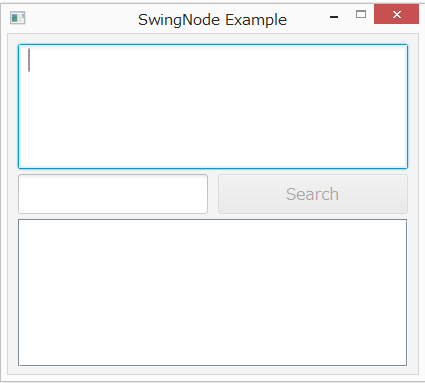
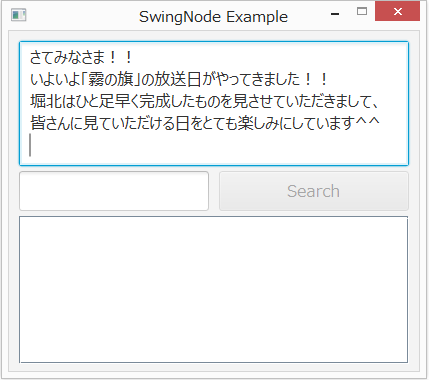
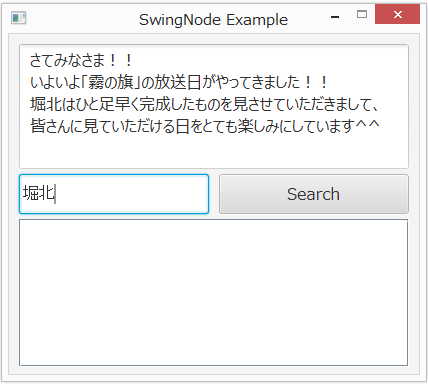
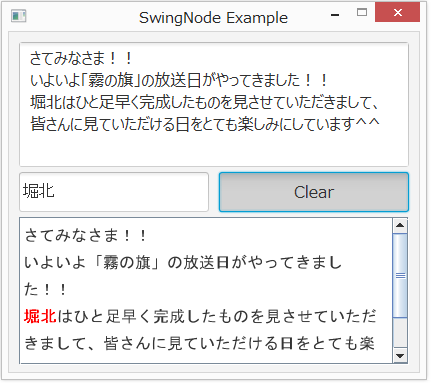
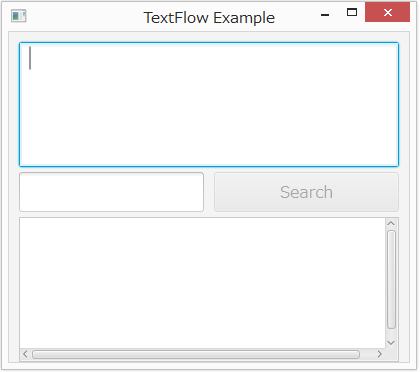
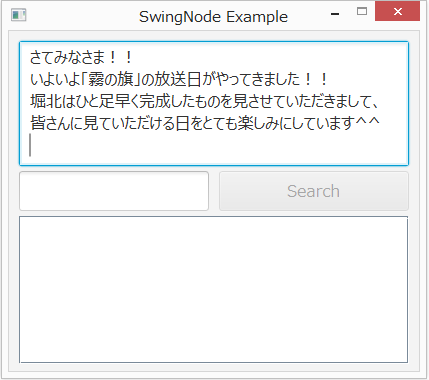
プログラムの実行結果は次のようになります。

1

2

3

4


いちおう動くけど見栄えが良いものではありませんね。

ちなみに私は疑り深い人間なので試しに AWT のスレッドを使わなければ本当に駄目?なのか試してみました。

コンパイルは通りました。

実行時エラーでも出るのかなと思いきや何も起こりませんでした。

このような小さなプログラムでははっきりした不具合が出ないようです。

裏を返せば非常に危険だということになるのかな?

もう一つ気がかりなことは時々プログラムの起動時に黒くなってしまうことがあります。

やっぱり何か無理があるのかもしれない。(単なるバグだと思う。)

そんなこんなでせっかく JavaFX でプログラム組むんだから古い Swing なんて面倒な思いしてまで使いたくないよね!

そこで TextFlow を使ってみることにしました。

TextFlow は JTextPane と違って編集ができません。

ただ表示するだけです。

使い方も至って簡単です。

javafx.scene.text.Text クラスのインスタンスを生成しそれにテキスト及び書式を設定します。

その Text オブジェクトを TextFlow インスタンス生成時のコンストラクタの引数として渡してあげればいいだけです。

もしくは textFlow.getChildren().add(text); として TextFlow インスタンスに加えることもできます。

簡単に使えてスタイルの自由度も JtextPane より遙かに高いので使い道はあるかと思います。

Text のスタイルは public final void setStyle(String value) を使って設定します。

引数はインライン CSS を与えるだけのお手軽仕様です。

TextFlow を使ったサンプルプログラムも載せておきます。


package jp.yucchi.textflowexample;

import javafx.application.Application;
import javafx.fxml.FXMLLoader;
import javafx.scene.Parent;
import javafx.scene.Scene;
import javafx.stage.Stage;

/**
 *
 * @author Yucchi
 */
public class TextFlowExample extends Application {

    @Override
    public void start(Stage stage) throws Exception {
        Parent root = FXMLLoader.load(getClass().getResource("FXMLDocument.fxml"));

        Scene scene = new Scene(root);
        stage.setTitle("TextFlow Example");
        stage.setScene(scene);
        stage.show();
    }

    /**
     * @param args the command line arguments
     */
    public static void main(String[] args) {
        launch(args);
    }

}

package jp.yucchi.textflowexample;

import java.net.URL;
import java.util.ResourceBundle;
import java.util.regex.Matcher;
import java.util.regex.Pattern;
import javafx.beans.binding.Bindings;
import javafx.event.ActionEvent;
import javafx.fxml.FXML;
import javafx.fxml.Initializable;
import javafx.scene.control.TextArea;
import javafx.scene.control.TextField;
import javafx.scene.control.ToggleButton;
import javafx.scene.text.Text;
import javafx.scene.text.TextFlow;

/**
 *
 * @author Yucchi
 */
public class FXMLDocumentController implements Initializable {

    @FXML
    TextArea textArea;

    @FXML
    TextField textField;

    @FXML
    ToggleButton search;

    @FXML
    TextFlow textFlow;

    private Text text;

    @FXML
    public void handleSearch(ActionEvent event) {

        if (search.isSelected()) {
            search.setText("Clear");
            makeSearchText();
        } else {
            search.setText("Search");
            textArea.setText("");
            textField.setText("");
            textFlow.getChildren().removeAll(textFlow.getChildren());
        }

    }

    @Override
    public void initialize(URL url, ResourceBundle rb) {

        search.disableProperty()
                .bind(
                        Bindings.when(textArea.textProperty().isEmpty().or(textField.textProperty().isEmpty()))
                        .then(true)
                        .otherwise(false));

    }

    private void makeSearchText() {

        int pos = 0;
        String sourceText = textArea.getText();

        final Pattern thePattern = Pattern.compile(textField.getText());
        final Matcher matcher = thePattern.matcher(sourceText);

        int start;
        int end;

        while (matcher.find()) {

            start = matcher.start();
            end = matcher.end();

            if (start == 0) {

                this.text = new Text(sourceText.substring(start, end));
                this.text.setStyle("-fx-font-size: 24px;-fx-fill: linear-gradient(from 0% 0% to 100% 200%, repeat, aqua 0%, red 50%);-fx-stroke: black;-fx-stroke-width: 1;");
                textFlow.getChildren().add(this.text);
                pos = end;
            } else {
                if (pos != start) {

                    this.text = new Text(sourceText.substring(pos, start));
                    this.text.setStyle("-fx-font-size: 16px;");
                    textFlow.getChildren().add(this.text);
                }

                this.text = new Text(sourceText.substring(start, end));
                this.text.setStyle("-fx-font-size: 24px;-fx-fill: linear-gradient(from 0% 0% to 100% 200%, repeat, aqua 0%, red 50%);-fx-stroke: black;-fx-stroke-width: 1;");
                textFlow.getChildren().add(this.text);
                pos = end;
            }

        }

        if (pos < sourceText.length()) {

            this.text = new Text(sourceText.substring(pos, sourceText.length()));
            this.text.setStyle("-fx-font-size: 16px;");
            textFlow.getChildren().add(this.text);
        }

    }

}

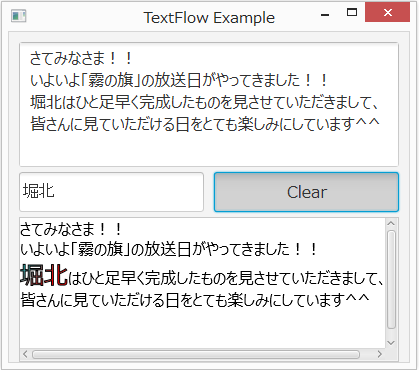
このプログラムの実行結果は次のようになります。

5

2

7

8


やっぱ JavaFX オンリーでつくったプログラムのほうが見栄えがいいですね!

それにしても JavaFX っておもしろいね!

この二つのサンプルプログラムでは JavaFX Night で櫻庭さんが例を挙げていたようなことをこの二つのプログラムでやっています。

TextField と TextArea に文字が入力されてなければトグルボタンを非活性化にし、文字が入力されたら活性化させることを Bind を使って実装してみました。

       search.disableProperty()
                .bind(
                        Bindings.when(textArea.textProperty().isEmpty().or(textField.textProperty().isEmpty()))
                        .then(true)
                        .otherwise(false));

Java らしくない気がしないでもないですが便利です。

あっ、つまり検索してから TextArea か TextField をどちらかのテキストを空にしてしまったら Clear できないってことになるな。

まっ、いいか。

トグルボタン使っちゃったからなぁ・・・

ただのサンプルなのでそこらへんは見逃してくださいまし!(>_<。)

JavaFX 楽しい!

Hatena タグ: