このエントリーは JavaFX の MeshView を試してみる の続きです。
今回は立方体を表示させるプログラムを組んでみます。
立方体だからといって複雑になり難しくなることはありません。
しょせん、最小構成のポリゴン( TriangleMesh ) の集まりです。
立方体の頂点の座標は下図のようにしました。
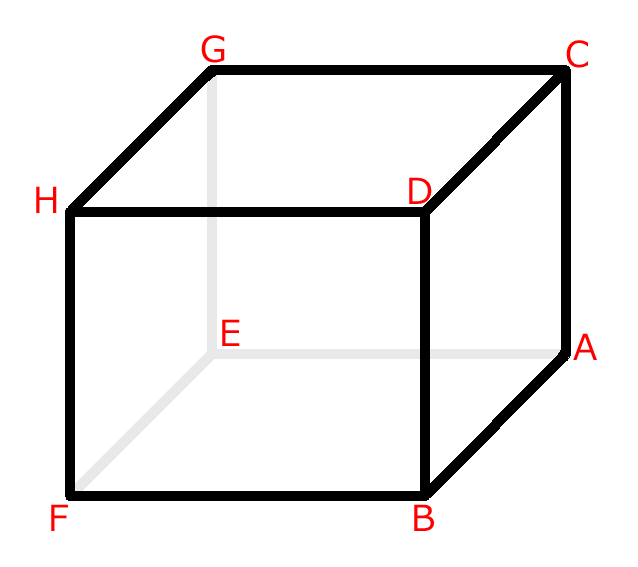
この立方体に貼るテクスチャは次のものを使います。
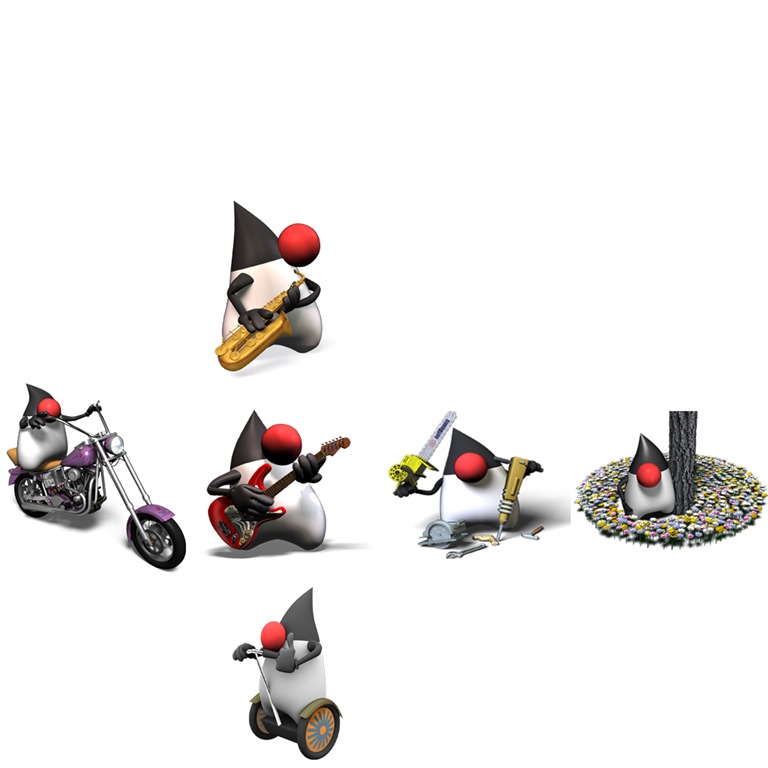
これを先ほの立方体へ貼ります。
解りやすくするためにテクスチャの座標とインデックスをいれた画像を用意しました。
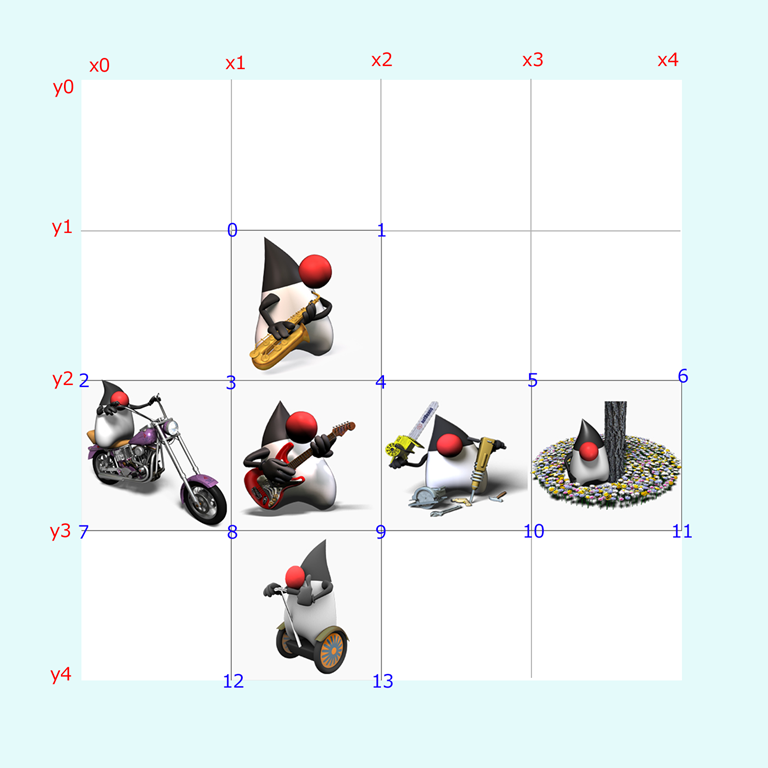
前回のエントリーをお読みになった方は下記のソースコードを見たら何をやっているか理解できるでしょう。
package jp.yucchi.dukemeshbox;

import static java.lang.Math.abs;
import javafx.application.Application;
import javafx.beans.property.DoubleProperty;
import javafx.beans.property.SimpleDoubleProperty;
import javafx.geometry.Point3D;
import javafx.scene.AmbientLight;
import javafx.scene.Group;
import javafx.scene.PerspectiveCamera;
import javafx.scene.PointLight;
import javafx.scene.Scene;
import javafx.scene.SceneAntialiasing;
import javafx.scene.image.Image;
import javafx.scene.input.PickResult;
import javafx.scene.paint.Color;
import javafx.scene.paint.PhongMaterial;
import javafx.scene.shape.MeshView;
import javafx.scene.shape.TriangleMesh;
import javafx.scene.transform.Rotate;
import javafx.stage.Stage;

/**
 *
 * @author Yucchi
 */
public class DukeMeshBox extends Application {

    private double anchorX;
    private double anchorY;
    private double anchorAngleX = 0;
    private double anchorAngleY = 0;
    private final DoubleProperty angleX = new SimpleDoubleProperty(20.0d);
    private final DoubleProperty angleY = new SimpleDoubleProperty(25.0d);

    @Override
    public void start(Stage primaryStage) {

        final MeshView meshBox = new MeshView(new MeshBox(200f, 200f, 200f));

        Image diffuseMap = new Image(DukeMeshBox.class.getResource("resources/duke_uv.jpg").toExternalForm());

        PhongMaterial material = new PhongMaterial();

        material.setDiffuseMap(diffuseMap);

        meshBox.setMaterial(material);

        // 環境光設定
        final AmbientLight ambient = new AmbientLight();
        ambient.setColor(Color.rgb(90, 90, 90, 0.6));

        // ポイントライト設定
        PointLight point = new PointLight();
        point.setColor(Color.WHITE);
        point.setLayoutX(-600.0d);
        point.setLayoutY(-200.0d);
        point.setTranslateZ(-400.0d);

        PointLight point2 = new PointLight();
        point2.setColor(Color.SKYBLUE);
        point2.setLayoutX(600.0d);
        point2.setLayoutY(-200.0d);
        point2.setTranslateZ(-400.0d);

        PerspectiveCamera camera = new PerspectiveCamera(true);

        // Field of View
        camera.setFieldOfView(45.5d);
        // Clipping Planes
        camera.setNearClip(1.0d);
        camera.setFarClip(1_000_000.0d);

        camera.setTranslateZ(-800);

        final Group root = new Group(meshBox);

        Rotate xRotate;
        Rotate yRotate;
        meshBox.getTransforms().setAll(
                xRotate = new Rotate(0, Rotate.X_AXIS),
                yRotate = new Rotate(0, Rotate.Y_AXIS)
        );
        xRotate.angleProperty().bind(angleX);
        yRotate.angleProperty().bind(angleY);

        root.getChildren().addAll(ambient, point, point2);

        Scene scene = new Scene(root, 1_024, 768, true, SceneAntialiasing.BALANCED);

        scene.setFill(Color.ALICEBLUE);

        scene.setCamera(camera);

        scene.setOnMousePressed(event -> {
            anchorX = event.getSceneX();
            anchorY = event.getSceneY();
            anchorAngleX = angleX.get();
            anchorAngleY = angleY.get();
        });

        scene.setOnMouseDragged(event -> {
            angleX.set(anchorAngleX - (anchorY - event.getSceneY()));
            angleY.set(anchorAngleY + anchorX - event.getSceneX());
        });

        scene.setOnMouseClicked(event -> {
            PickResult pickResult = event.getPickResult();
            System.out.println("PickResult Node : " + pickResult.getIntersectedNode());
            System.out.println("PickResult Face : " + pickResult.getIntersectedFace());
            System.out.println("PickResult TexCoord : " + pickResult.getIntersectedTexCoord());
            System.out.println("PickResult Distance : " + pickResult.getIntersectedDistance());
            if (pickResult.getIntersectedNode() == meshBox) {
                Point3D point3d = pickResult.getIntersectedPoint();
                if (point3d.getX() != 0.0d && point3d.getY() != 0.0d && point3d.getZ() != 0.0d) {
                    meshBox.setScaleX(abs(point3d.getX() / 100.0d) * 1.8d);
                    meshBox.setScaleY(abs(point3d.getY() / 100.0d) * 1.8d);
                    meshBox.setScaleZ(abs(point3d.getZ() / 100.0d) * 1.8d);
                } else {
                    meshBox.setScaleX(0.5d);
                    meshBox.setScaleY(0.5d);
                    meshBox.setScaleZ(0.5d);
                }
            } else {
                meshBox.setScaleX(1.0d);
                meshBox.setScaleY(1.0d);
                meshBox.setScaleZ(1.0d);
            }
        });

        primaryStage.setTitle("Duke MeshBox");
        primaryStage.setScene(scene);
        primaryStage.show();
    }

    /**
     * @param args the command line arguments
     */
    public static void main(String[] args) {
        launch(args);
    }

    private class MeshBox extends TriangleMesh {

        MeshBox(float w, float h, float d) {

            float hw = w / 2f;
            float hh = h / 2f;
            float hd = d / 2f;

            float x0 = 0f;
            float x1 = 1f / 4f;
            float x2 = 2f / 4f;
            float x3 = 3f / 4f;
            float x4 = 1f;
            float y0 = 0f;
            float y1 = 1f / 4f;
            float y2 = 2f / 4f;
            float y3 = 3f / 4f;
            float y4 = 1f;

            this.getPoints().addAll(
                    hw, hh, hd,   //point A
                    hw, hh, -hd,  //point B
                    hw, -hh, hd,  //point C
                    hw, -hh, -hd, //point D
                    -hw, hh, hd,  //point E
                    -hw, hh, -hd, //point F
                    -hw, -hh, hd, //point G
                    -hw, -hh, -hd //point H
            );

            this.getTexCoords().addAll(
                    x1, y1, // idx 0
                    x2, y1, // idx 1
                    x0, y2, // idx 2
                    x1, y2, // idx 3
                    x2, y2, // idx 4
                    x3, y2, // idx 5
                    x4, y2, // idx 6
                    x0, y3, // idx 7
                    x1, y3, // idx 8
                    x2, y3, // idx 9
                    x3, y3, // idx 10
                    x4, y3, // idx 11
                    x1, y4, // idx 12
                    x2, y4  // idx 13
            );

            this.getFaces().addAll(
                    0, 10, 2, 5, 1, 9,  //triangle A-C-B
                    2, 5, 3, 4, 1, 9,   //triangle C-D-B
                    4, 7, 5, 8, 6, 2,   //triangle E-F-G
                    6, 2, 5, 8, 7, 3,   //triangle G-F-H
                    0, 13, 1, 9, 4, 12, //triangle A-B-E
                    4, 12, 1, 9, 5, 8,  //triangle E-B-F
                    2, 1, 6, 0, 3, 4,   //triangle C-G-D
                    3, 4, 6, 0, 7, 3,   //triangle D-G-H
                    0, 10, 4, 11, 2, 5, //triangle A-E-C
                    2, 5, 4, 11, 6, 6,  //triangle C-E-G
                    1, 9, 3, 4, 5, 8,   //triangle B-D-F
                    5, 8, 3, 4, 7, 3    //triangle F-D-H
            );

            this.getFaceSmoothingGroups().addAll(
                    0, 0, 1, 1, 2, 2, 3, 3, 4, 4, 5, 5
            );

            System.out.println("PointElementSize : " + this.getPointElementSize());
            System.out.println("TexCoordElementSize : " + this.getTexCoordElementSize());
            System.out.println("FaceElementSize : " + this.getFaceElementSize());

        }

    }

}
今回はちょっとピッキング API でお遊びをいれています。
ピッキング API で取得した情報を標準出力に表示させたり、
オブジェクトの拡大縮小をやっています。( この部分は JavaFX の標準機能だけでシンプルな 3D トイピアノをつくろう を参考にしてください。)
scene.setOnMouseClicked(event -> {
PickResult pickResult = event.getPickResult();
System.out.println(“PickResult Node : ” + pickResult.getIntersectedNode());
System.out.println(“PickResult Face : ” + pickResult.getIntersectedFace());
System.out.println(“PickResult TexCoord : ” + pickResult.getIntersectedTexCoord());
System.out.println(“PickResult Distance : ” + pickResult.getIntersectedDistance());
if (pickResult.getIntersectedNode() == meshBox) {
Point3D point3d = pickResult.getIntersectedPoint();
if (point3d.getX() != 0.0d && point3d.getY() != 0.0d && point3d.getZ() != 0.0d) {
meshBox.setScaleX(abs(point3d.getX() / 100.0d) * 1.8d);
meshBox.setScaleY(abs(point3d.getY() / 100.0d) * 1.8d);
meshBox.setScaleZ(abs(point3d.getZ() / 100.0d) * 1.8d);
} else {
meshBox.setScaleX(0.5d);
meshBox.setScaleY(0.5d);
meshBox.setScaleZ(0.5d);
}
} else {
meshBox.setScaleX(1.0d);
meshBox.setScaleY(1.0d);
meshBox.setScaleZ(1.0d);
}
});
これによって得られる情報は下記のようになります。
PickResult Node : MeshView@7bc4dd1a
PickResult Face : 10
PickResult TexCoord : Point2D [x = 0.4647918545001403, y = 0.5826962887300013]
PickResult Distance : 675.187084447299
最後の PickResult Distance はカメラからの距離となります。
ついでに 3D オブジェクトの情報もとってみました。
System.out.println(“PointElementSize : ” + this.getPointElementSize());
System.out.println(“TexCoordElementSize : ” + this.getTexCoordElementSize());
System.out.println(“FaceElementSize : ” + this.getFaceElementSize());
プログラムの実行結果で得られた値は下記のようになります。
PointElementSize : 3
TexCoordElementSize : 2
FaceElementSize : 6
これらは上から 3, 2, 6 といつも同じ数値を返すようです。
私はてっきり各配列の要素数を返すものだと思い込んでいたので少しばかり悩んで時間を無駄にしてしまいました。
これらの存在意義が解らないので未だにすっきりしていないし、間違って解釈している可能性もあるので霧の中にいるような感覚が今もあります。
あと、今回は複数のフェイスで 3D オブジェクトが構築されているので次のメソッドを使用します。
javafx.scene.shape.TriangleMesh クラスの ObservableIntegerArray getFaceSmoothingGroups() メソッドです。
これを使いフェイスをグルーピングしてスムーズに表示させることが可能となるようです。
this.getFaceSmoothingGroups().addAll(
0, 0, 1, 1, 2, 2, 3, 3, 4, 4, 5, 5
);
上記コードは、triangle A-C-B と triangle C-D-B をグルーピング ( 0 )
triangle E-F-G と G-F-H ( 1 )、triangle A-B-E と triangle E-B-F ( 2 ) … という具合にグルーピングしていきます。
最終的にはフェイスの数と faceSmoothingGroups の配列の要素数は等しくなります。
これを間違えてもコンパイルエラーにはなりませんし、プログラムもエラーで止まることなく実行されてしまいます。
ただ肝心の 3D オブジェクトは表示されることは無いでしょう。
あっ、空だと表示されますね。(当たり前か)
さて、この機能なんですが本当に効果があるのでしょうか?
私の環境では違いを確認できませんでした。
このような小さなプログラムでは効果が確認できないのかもしれません。
最後にこのプログラムの動画を貼っておきますので興味のある方はご覧くださいませ。
JavaFX 楽しすぎるから年末の TODO が減らない! どうしよう(>_<。)